PowerCLI, VMware Management Framework bir PowerShell modülüdür. Kurulumu için aşağıdaki adımlar takip edilmelidir;
PowerShell “Run as Administrator” olarak çalıştırılır.
1- İndirme/Kurulum
“Install-Module” komutu ile kurulumu başlatıyoruz
Install-Module -Name VMware.PowerCLI2- Kontrol
İndirme ve kurulum kontrolü için “Get” komutu ile aratıyoruz, aşağıdaki gibi uzun modül listesini görüntülüyor olmamız gerek
Get-Module -ListAvailable -Name VMware*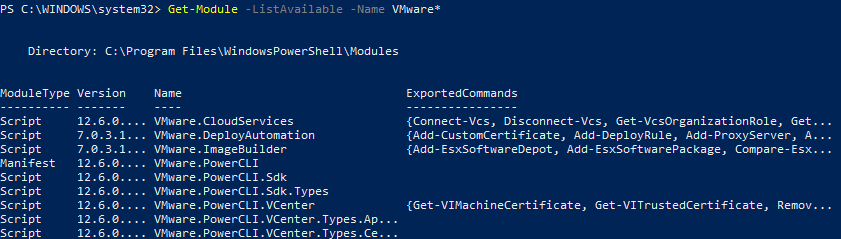
Bu aşamada “Connect-VIServer” komutu ile bağlantı sağlamaya çalışırsak aşağıdaki hatayı alırız

3- Import
Modül kurulumu tamam ancak import edilmediği için hata alınmakta, “Import-Module” ile işlemi sağlıyoruz
Import-Module -Name Vmware.PowerCLI
Running scripts disable olduğu için tekrar hata mesajı gördük, aşağıdaki komutu yazarak tekrar import ediyoruz
Set-ExecutionPolicy RemoteSigned
Import-Module -Name Vmware.PowerCLI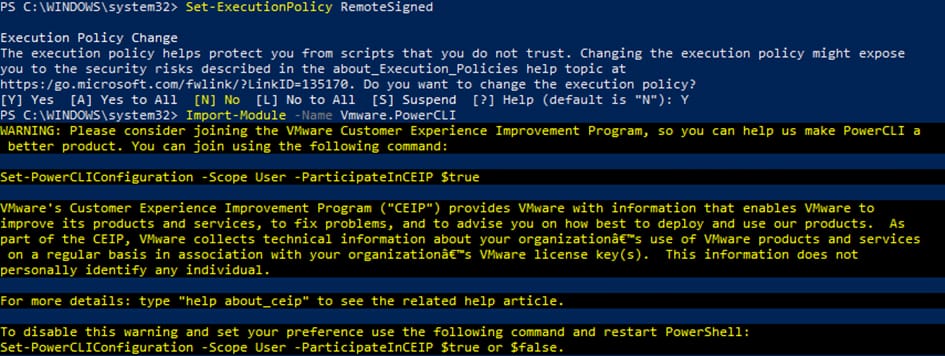
4- Sertifika Hatası
“Connect-VIServer” komutu ile tekrar bağlantı deniyoruz ve sertifika hatası alıyoruz
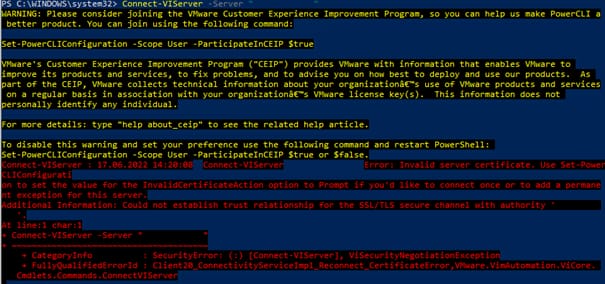
Son olarak sertifika uyarısı için aşağıdaki komutu yazıyoruz ve tekrar bağlantı deniyoruz;
Set-PowerCLIConfiguration -InvalidCertificateAction Ignore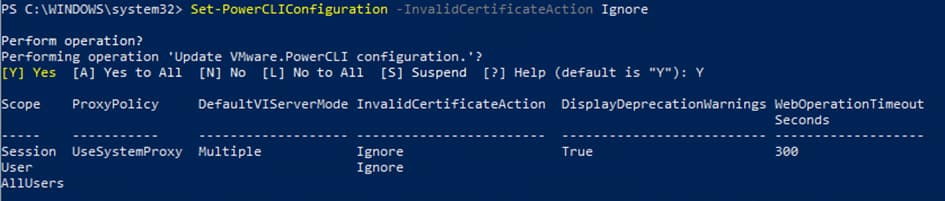
Connect-VIServer -Server “HostnameorIP” -User “Name” -Password “Parola”

Başarılı bir şekilde vCenter bağlantısı sağlamış olduk!

3 yorum
Eleanort · Haziran 23, 2024 10:27 pm tarihinde
Great article! I appreciate the clear and insightful perspective you’ve shared. It’s fascinating to see how this topic is developing. For those interested in diving deeper, I found an excellent resource that expands on these ideas: check it out here. Looking forward to hearing others’ thoughts and continuing the discussion!
Wendyt · Temmuz 2, 2024 9:43 am tarihinde
This article provided a lot of valuable information. The author’s perspective was both refreshing and enlightening. It would be interesting to hear how others feel about these points.
Nicolet · Temmuz 22, 2024 11:41 pm tarihinde
Insightful read! Your analysis is spot-on.